Initial Assessment
Cameron described two issues when he dropped this unit off. First, something was rattling around inside the chassis whenever the amp was tilted or moved. Second, the previous technician who had looked at it “couldn’t figure out how to update it.” Both seemed straightforward enough at first glance, but the firmware question turned out to be a dead end by design.
Physical inspection came first. Three of the rack ear mounting screws were missing, which is cosmetic but worth noting for reassembly. Tilting the chassis confirmed the rattle immediately: something small and light was sliding around on the inside, clearly detached from wherever it belonged. That would wait for the teardown.
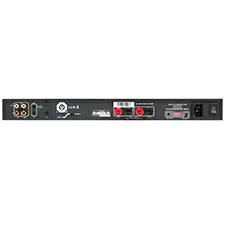
The rear panel is where things got interesting. Alongside the expected connections (RCA inputs and pass-throughs, 12V trigger, IR input, speaker binding posts, voltage selector, IEC inlet with T8AL/250V fuse) there are two features that do not appear on the older non-R model: a mini USB Type-B port and a two-position toggle switch labeled UPDATE and OPERATE.
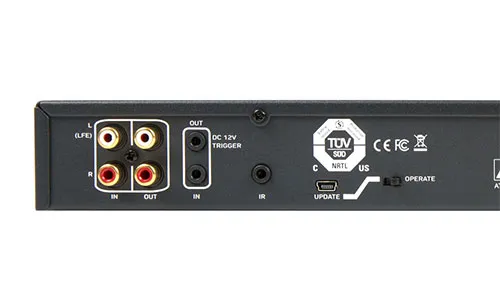
I pulled the two available manual revisions to compare what Episode had to say about these. The 2015 manual, the original release, describes the mini USB port as “Reserved for future use” and the UPDATE switch position as “For future use only.” The 2024 Rev B manual, sourced from Control4’s documentation portal, tells a different story for the switch. It now reads “For firmware update use only” with an added note that the amplifier will not function as expected if the switch is not set to OPERATE. But the USB port description remains unchanged: still “Reserved for future use,” nine years later.
I searched the SnapAV product page support tab, the SnapAV firmware downloads page, and OvrC documentation. The product page offers an installation manual, a control protocol PDF, and an IR codes spreadsheet. No firmware files. The firmware page lists update procedures for Autonomic and Mirage amplifiers, completely different product lines that update over Telnet via Ethernet. OvrC, Snap One’s cloud management platform, can push firmware to some Episode amplifiers over the network, but the EA-AMP-SUB-1D-500R has no network connectivity at all. No Ethernet, no WiFi.
The conclusion is straightforward. The hardware for firmware updates exists on the board. The manual eventually acknowledged the UPDATE switch’s purpose. But Episode never released firmware files, an update utility, or any documentation describing the procedure. The update path, if it functions at all, is accessible only through dealer support. The previous technician was not incompetent; he was searching for something that does not exist in the public domain.